Have you ever opened a website and noticed the words “Not Secure” appearing in your browser’s address bar, right next to the website’s URL? If so, you were looking at a website running on HTTP, and your browser was warning you about it. In 2026, that warning is not a minor technicality. It is a signal that can cost a business customers, rankings, and credibility.
The difference between HTTP and HTTPS is one of the most important, and most misunderstood, aspects of how websites work. Whether you are a business owner wondering if your site is secure, a marketer trying to understand why your website is not ranking as well as it should, or simply someone who wants to know what that padlock icon in your browser actually means, this guide covers everything you need to know.
What Is HTTP?
HTTP stands for Hypertext Transfer Protocol. In plain English, it is the system that your web browser and a website’s server use to communicate with each other. When you type a website address into your browser and press enter, HTTP is the set of rules that governs how that request is sent and how the website’s content is sent back to you.
HTTP has been the foundation of the web since the early 1990s and it works perfectly well for the basic purpose of transferring information. The significant limitation of HTTP is that all of that information, every piece of data that travels between your browser and the website’s server, is sent in plain text. This means that anyone with the right tools who intercepts that data can read it completely, as clearly as reading a letter that has been sent without an envelope.
In the early days of the internet, when websites were mostly static pages of information and users rarely submitted personal data online, this was not a serious concern. Today, with online shopping, banking, form submissions, login pages, and sensitive data transfers happening billions of times a day, it is a very different story.
What Is HTTPS?
HTTPS stands for Hypertext Transfer Protocol Secure. It is the secure version of HTTP, doing exactly the same job of transferring data between browsers and servers, but with a critical addition: encryption. When a website uses HTTPS, all data transferred between the user’s browser and the website’s server is encrypted, meaning it is scrambled into unreadable code that can only be deciphered by the intended recipient.
This encryption is what the padlock icon in your browser’s address bar represents. When you see that padlock, particularly on a website where you are entering personal information, payment details, or login credentials, it tells you that your data is protected in transit and cannot be read by anyone who might intercept it along the way.
HTTPS also unlocks access to HTTP/2 and HTTP/3, the modern, faster versions of the web’s underlying protocol. These newer protocols significantly improve page loading speed, which directly benefits both user experience and Core Web Vitals scores. In short, HTTPS does not just make your website more secure, it also makes it faster.
What Is an SSL Certificate?
An SSL certificate is the digital document that enables HTTPS on your website. SSL stands for Secure Sockets Layer, the original encryption technology that has since been updated and replaced by TLS (Transport Layer Security). Despite TLS being the current standard, the term SSL has stuck, and you will still hear SSL and TLS used interchangeably across the industry. Both refer to the same thing: the technology that encrypts data transmitted between a user and a website.
SSL certificates are issued by trusted organisations called Certificate Authorities (CAs). When you install an SSL certificate on your website, you are essentially telling browsers: “This website is who it says it is, and all data transferred here is encrypted.” The browser checks this certificate, verifies it with the issuing Certificate Authority, and, if everything checks out, displays the padlock icon to the user.
There are three main types of SSL certificates, each offering a different level of identity verification:
Domain Validation (DV) Certificate
The most common type, accounting for 94.3% of all issued SSL certificates. A DV certificate verifies that the applicant owns or controls the domain name. It is the fastest to obtain (often issued in minutes), the least expensive (frequently free through providers like Let’s Encrypt), and perfectly suitable for the vast majority of business websites, blogs, and informational sites.
Organisation Validation (OV) Certificate
An OV certificate goes a step further, verifying not just domain ownership but also the legal identity of the organisation behind the website. The Certificate Authority checks business registration documents and confirms the organisation’s legitimacy. OV certificates are a good choice for business websites where demonstrating organisational credibility is important, such as professional services firms.
Extended Validation (EV) Certificate
EV certificates involve the most rigorous verification process, confirming detailed legal, physical, and operational details of an organisation. They are most commonly used by large financial institutions, e-commerce platforms, and organisations where the highest level of trust verification is required. It is important to note that from an SEO perspective, all three certificate types provide identical ranking benefit, the type of SSL certificate you use does not affect your search engine rankings.
HTTP vs HTTPS: What Is the Difference?
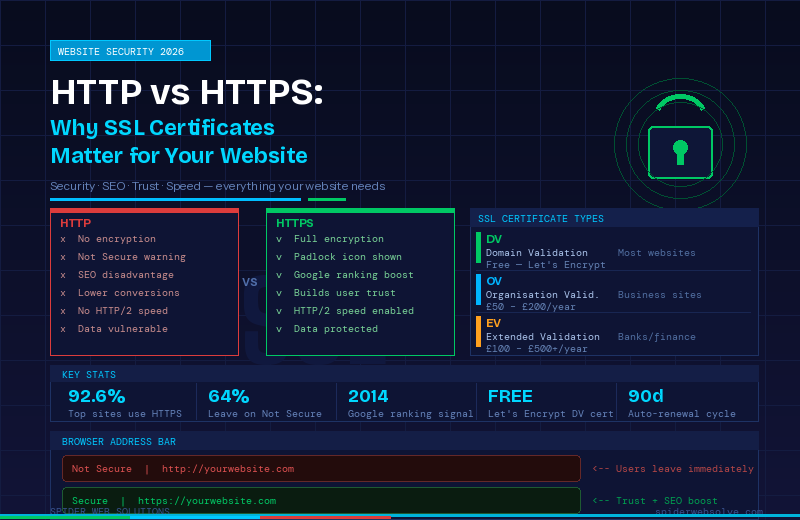
The core difference between HTTP and HTTPS comes down to one word: security.Here is how they compare across the dimensions that matter most for your website:
- Security: HTTP sends all data in plain, readable text. HTTPS encrypts all data in transit, making it unreadable to anyone who intercepts it
- Browser display: HTTP sites show “Not Secure” in Chrome and other modern browsers. HTTPS sites display a padlock icon
- Speed: HTTPS unlocks HTTP/2 and HTTP/3 protocols, which significantly improve page loading speed compared to HTTP
- SEO: Google uses HTTPS as a confirmed ranking signal. HTTP sites are at a disadvantage in search results
- Trust: Users are significantly more likely to trust, engage with, and make purchases on HTTPS websites
- Analytics accuracy: Traffic from HTTPS sites to HTTP sites loses referral data, it appears as direct traffic in Google Analytics, making your data less accurate
- Data protection: On HTTP sites, data entered into forms (including passwords and payment details) can be intercepted. On HTTPS sites, this data is fully encrypted
The bottom line: as of October 2026, 92.6% of the top 100,000 websites use HTTPS by default. If your website is still running on HTTP, it is in a rapidly shrinking minority, and that has consequences.
Why Does HTTPS Matter for SEO?
Google confirmed HTTPS as a ranking signal in August 2014, and in 2026, its role in search engine optimisation has expanded well beyond a simple checkbox.
Here is the full picture of how HTTPS affects your search visibility:
Direct Ranking Signal
Google gives HTTPS sites a direct, confirmed ranking advantage over HTTP sites. While this signal is described as a lightweight tiebreaker rather than a dominant ranking factor, it means that in competitive search results where other factors are roughly equal, the HTTPS site will consistently outperform the HTTP one.
Page Speed and Core Web Vitals
HTTPS is required to use HTTP/2 and HTTP/3, the modern web protocols that dramatically improve how quickly pages load. Since Google uses Core Web Vitals (including Largest Contentful Paint and Cumulative Layout Shift) as ranking factors, the speed improvements that come with HTTPS have a meaningful indirect benefit for your search rankings.
Lower Bounce Rates
Research shows that 64% of users leave a website immediately after seeing a “Not Secure” warning. When visitors leave your site instantly, Google interprets this as a signal that your page is not meeting user needs, which negatively affects your rankings over time. HTTPS removes this barrier entirely, keeping users on your site and sending positive engagement signals to Google.
Referral Data Accuracy
When traffic flows from an HTTPS website to an HTTP website, the referral data is stripped, meaning the visit appears as direct traffic rather than referral traffic in your analytics. This makes your data less accurate and harder to act on. HTTPS to HTTPS traffic preserves all referral data correctly.
Chrome’s October 2026 Update
Starting in October 2026, Google Chrome, the world’s most widely used web browser, will warn every user by default before loading any public HTTP site. This is a significant escalation from the existing “Not Secure” label, making the consequences of remaining on HTTP more serious than ever before.
Why Does HTTPS Matter for Customer Trust?
Beyond SEO, the impact of HTTPS on customer trust and conversion rates is direct and measurable. The “Not Secure” warning that modern browsers display on HTTP sites is not subtle, it is prominently placed in the address bar, and users have become increasingly aware of what it means.
Consider the journey of a potential customer visiting your website for the first time. Before they have read a single word of your content, before they have seen your products or services, before they have any reason to trust or distrust you, their browser has already told them your site is not secure. For many users, that is enough to make them leave immediately and go to a competitor.
For e-commerce businesses and any website that collects leads through contact forms, the impact of HTTPS on conversion rates is particularly significant. Customers who are asked to enter their name, email address, phone number, or payment details on a website without HTTPS are being asked to share sensitive information on an unsecured channel. The padlock icon, by contrast, is a visible, familiar reassurance that their information is safe, and it meaningfully increases the likelihood that they will complete a form or make a purchase.
What Happens If Your Website Does Not Have HTTPS?
In 2026, the consequences of running a website on HTTP are more serious and wide-ranging than ever:
- Browser warnings: Chrome, Firefox, Safari, and Edge all display “Not Secure” warnings on HTTP pages. From October 2026, Chrome will display a full interstitial warning before loading HTTP sites
- SEO disadvantage: HTTP sites are at a confirmed ranking disadvantage against HTTPS competitors in Google search results
- Higher bounce rates:64% of users leave immediately upon seeing a “Not Secure” warning, directly increasing your bounce rate and reducing engagement signals
- Lower conversions: Visitors are significantly less likely to fill out contact forms, make purchases, or share personal information on HTTP sites
- Data vulnerability: Any information submitted through an HTTP site, including contact form details, travels unencrypted and can potentially be intercepted
- Slower loading: HTTP sites cannot use HTTP/2 or HTTP/3, meaning they miss out on significant page speed improvements
- Google Search Console alerts: Google actively flags HTTP pages in Search Console and may reduce crawl priority for HTTP pages
How to Get an SSL Certificate for Your Website
Getting HTTPS set up on your website is more straightforward than most business owners expect. Here is a step-by-step guide:
- Check your hosting provider first: The majority of reputable web hosting providers now include a free SSL certificate as standard with their hosting plans. Log into your hosting control panel and check whether SSL is already available, many hosting providers can activate it with a single click.
- Choose the right certificate type: For most business websites, a free Domain Validation (DV) certificate through Let’s Encrypt is completely sufficient and provides exactly the same SEO benefit as a paid certificate. For e-commerce stores or businesses that want additional identity verification, an OV or EV certificate is worth considering.
- Install the SSL certificate: If your hosting provider does not offer automatic SSL installation, you may need to install it manually or contact your hosting provider’s support team for assistance. Most reputable providers offer guided support for this process.
- Redirect all HTTP traffic to HTTPS: Installing an SSL certificate is only half the job. You also need to set up 301 redirects so that anyone visiting the HTTP version of your site is automatically redirected to the HTTPS version. This is typically done through your website’s .htaccess file or through your content management system’s settings.
- Update your Google Search Console and Google Analytics: Add your HTTPS site as a new property in Google Search Console, set it as the preferred domain, and update your Google Analytics settings to reflect the new URL format. This ensures your data remains accurate and complete.
- Check for and fix mixed content issues: Mixed content occurs when a page loads over HTTPS but contains resources (images, scripts, stylesheets) that are still loading over HTTP. Browsers flag or block mixed content, which can undermine the benefits of your SSL certificate. Use a tool like WhyNoPadlock or your browser’s developer tools to identify and fix any mixed content issues.
How Much Does an SSL Certificate Cost?
One of the most common misconceptions about SSL certificates is that they are expensive. In 2026, this is simply not the case for the vast majority of websites.
Free SSL certificates through Let’s Encrypt, a non-profit Certificate Authority backed by major technology companies, are available to any website owner at no cost. Let’s Encrypt now issues up to 10 million certificates per day and holds 54.73% of the global certificate authority market. Importantly, free DV certificates from Let’s Encrypt provide exactly the same encryption strength and the same SEO value as paid certificates costing hundreds of pounds per year.
The pricing landscape for SSL certificates in 2026 looks like this:
- Free DV certificates (Let’s Encrypt): £0, full encryption, identical SEO value to paid certificates, auto-renews every 90 days
- Paid DV certificates: £10 to £70 per year, same encryption as free, sometimes includes a warranty or dedicated support
- OV certificates: £50 to £200 per year, includes business identity verification
- EV certificates: £100 to £500+ per year, highest level of identity verification, typically used by banks, large e-commerce platforms, and financial institutions
For the overwhelming majority of small and medium business websites, a free SSL certificate through your hosting provider or Let’s Encrypt is the right choice. There is no SEO advantage to paying for a certificate, and the free option provides complete, robust encryption for your visitors.
Common SSL Certificate Mistakes Businesses Make
Installing an SSL certificate is a straightforward process, but there are several common mistakes that can undermine its effectiveness. Here are the ones to watch out for:
- Installing SSL but not setting up HTTP to HTTPS redirects: Without 301 redirects, visitors and search engines may still access the HTTP version of your site. The SSL certificate alone does not force users onto the secure version, you need to actively redirect them
- Leaving mixed content issues unresolved: A page that loads over HTTPS but pulls in images or scripts from HTTP URLs will trigger browser warnings and fail to display the padlock icon, negating the trust benefits of your SSL certificate
- Letting the SSL certificate expire: Let’s Encrypt certificates expire every 90 days. While most hosting providers set up automatic renewal, it is worth confirming that auto-renewal is active on your account. An expired certificate causes browsers to display a full-screen error blocking access to your site entirely
- Forgetting to update internal links after migrating to HTTPS: After switching from HTTP to HTTPS, any internal links that still point to the HTTP version of pages should be updated to use HTTPS, this avoids unnecessary redirect chains and ensures maximum crawl efficiency
- Not updating sitemaps and Search Console after migration: Your XML sitemap should reflect HTTPS URLs, and your Google Search Console property should be updated to track the HTTPS version of your site so you receive accurate data and alerts
Is Your Website Running on HTTPS?
HTTPS is not optional in 2026. It is a confirmed Google ranking factor, a browser trust signal, a prerequisite for the modern web protocols that improve your page speed, and an essential protection for your visitors’ data. The good news is that getting your website onto HTTPS has never been easier or more affordable, for most businesses, a free SSL certificate through your hosting provider is all you need.
If you are not sure whether your website has a valid SSL certificate, you can check right now by looking at your website’s address bar. If you see a padlock icon and your URL begins with https://, you are covered. If you see “Not Secure” or your URL begins with http://, it is time to take action.
At Spider Web Solutions, we help businesses of all sizes build and maintain websites that are secure, fast, and built to rank. With 15+ years of experience delivering web design and development solutions, and a team of specialists across SEO, PPC, content marketing, and digital strategy, we ensure every website we build comes with HTTPS as standard, along with all the technical optimisations that help it perform at its best.
Whether you need a full website build, a technical SEO audit to identify security and performance issues, or expert guidance on migrating your existing site to HTTPS, our team is ready to help. Get in touch with Spider Web Solutions today.